Motivation
Local inference is an exciting area of engineering and research, and the browser is a relatively new environment for running LLMs with the advent of WebGPU, a GPU programming framework deployed through the browser.
One challenge of running inference in the browser is the strict memory limitations imposed by browser vendors. The clip below shows a Safari tab running Transformers.js, a popular WebGPU inference engine from HuggingFace. When using Transformers.js to run Llama-3.2-1b-fp16, we saw the Safari tab’s memory usage spike to 20 GB before Safari killed the page.
Below is a memory usage figure from the paper showing the OOM from running a different model.
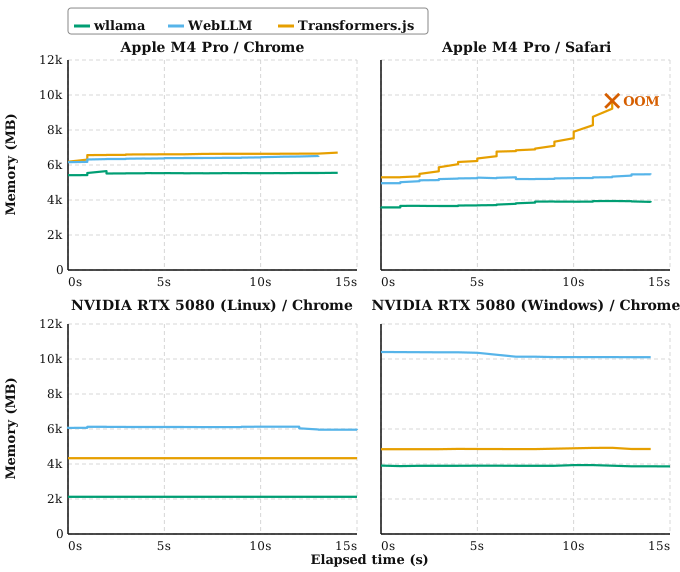
Our figure from the paper shows Transformers.js being killed by Safari due to OOM.
So we must be careful about how much memory our browser-based inference engines use. If we can save memory usage, we can pass those savings on to load larger models, which are generally more capable than smaller models. So we should try to save memory wherever we can!
In this blog, we detail two memory-saving optimizations from our Llamas on the Web paper.
Optimization #1: Streaming Model Weights from Hugging Face to Disk
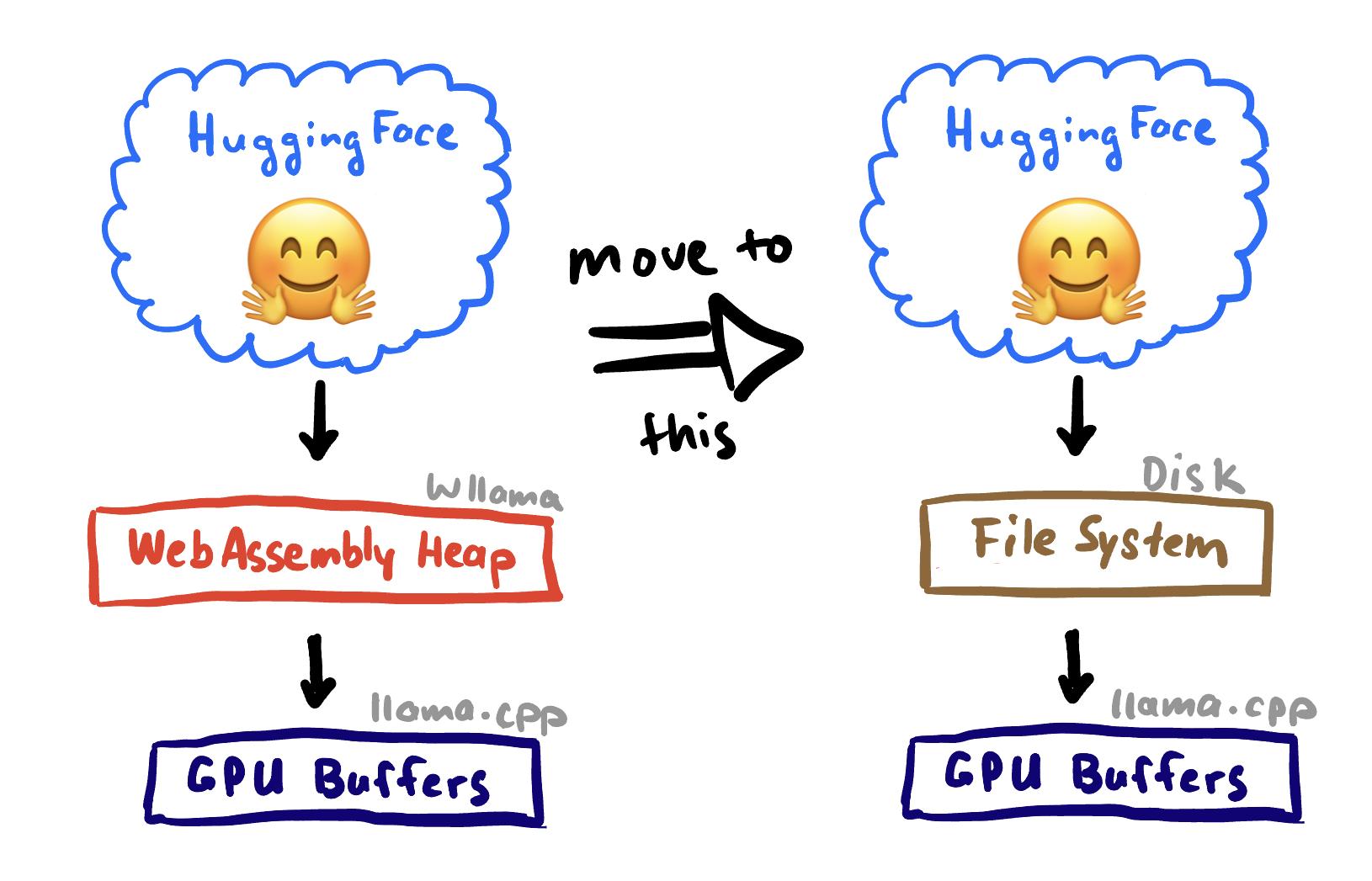
Originally, wllama fetched model weights from Hugging Face and stored them in its custom file system called HeapFS. HeapFS is an in-memory file system that lives in the WebAssembly (WASM) heap.
Models were fetched and temporarily stored in the WASM heap, then loaded into GPU buffers via llama.cpp’s weight loader.
But we can do better! Why not stream the weights from Hugging Face directly to disk, skipping the WASM heap?
Using OPFS
The Origin Private File System (OPFS) is a set of APIs available on mainstream browsers that provides tabs with private access to the machine’s filesystem. We can use this to store models directly on disk for our wllama tab process.
Results
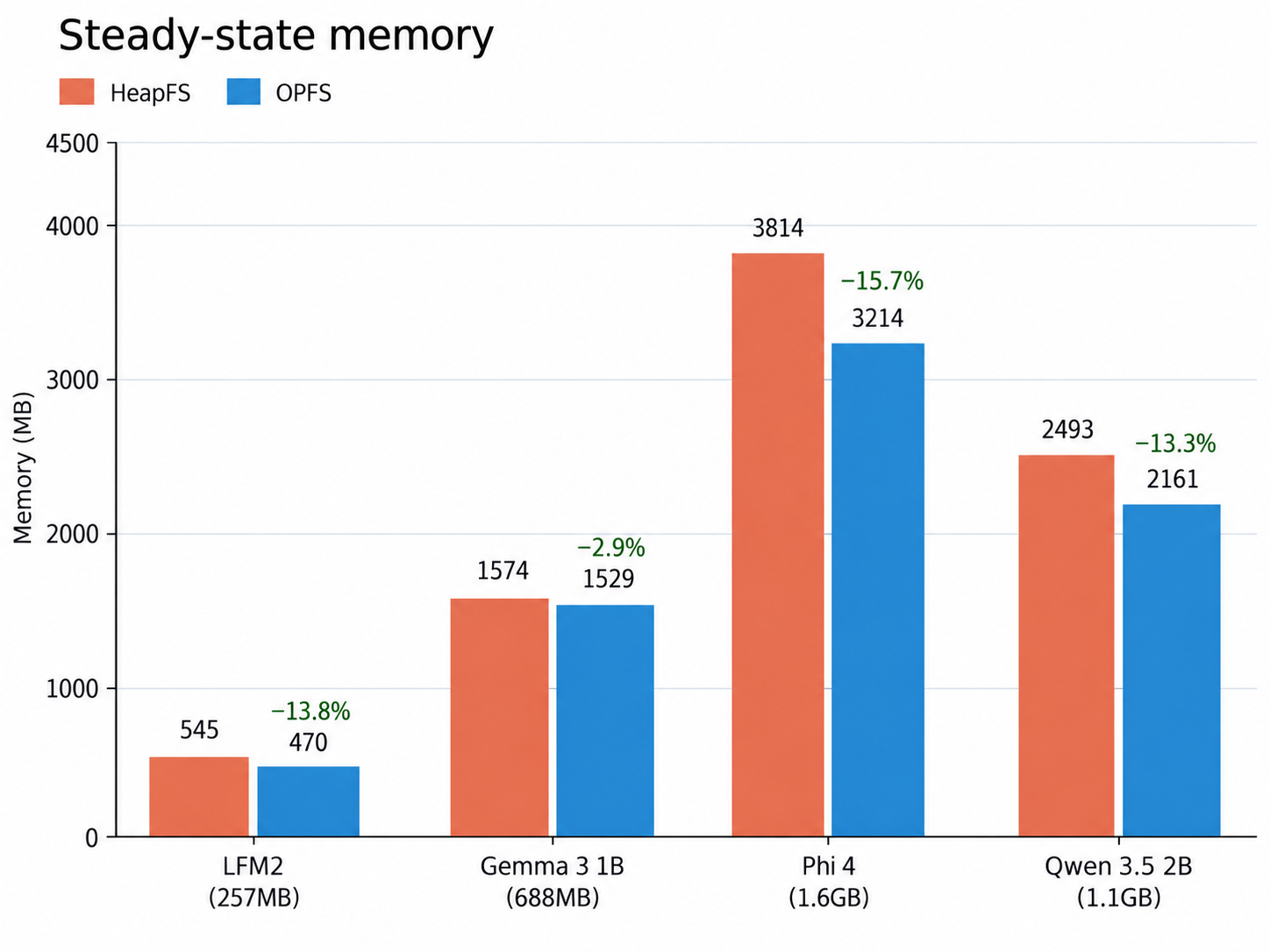
When we switched from storing models in the WASM-heap via HeapFS and stored them on disk via OPFS, we saw memory usage reductions across the board!
Optimization #2: Streaming Model Weights from Disk to GPU Buffers
Now that we’ve optimized loading weights from Hugging Face to disk, can we optimize loading weights from disk to GPU buffers?
We use llama.cpp’s weight loader to load tensors into GPU buffers, and it offers three loading modes:
- Memory–mapped:
mmapthe tensors into main memory, and then create buffers from the memory region directly - Synchronous: load each tensor individually via a resizable scratch buffer
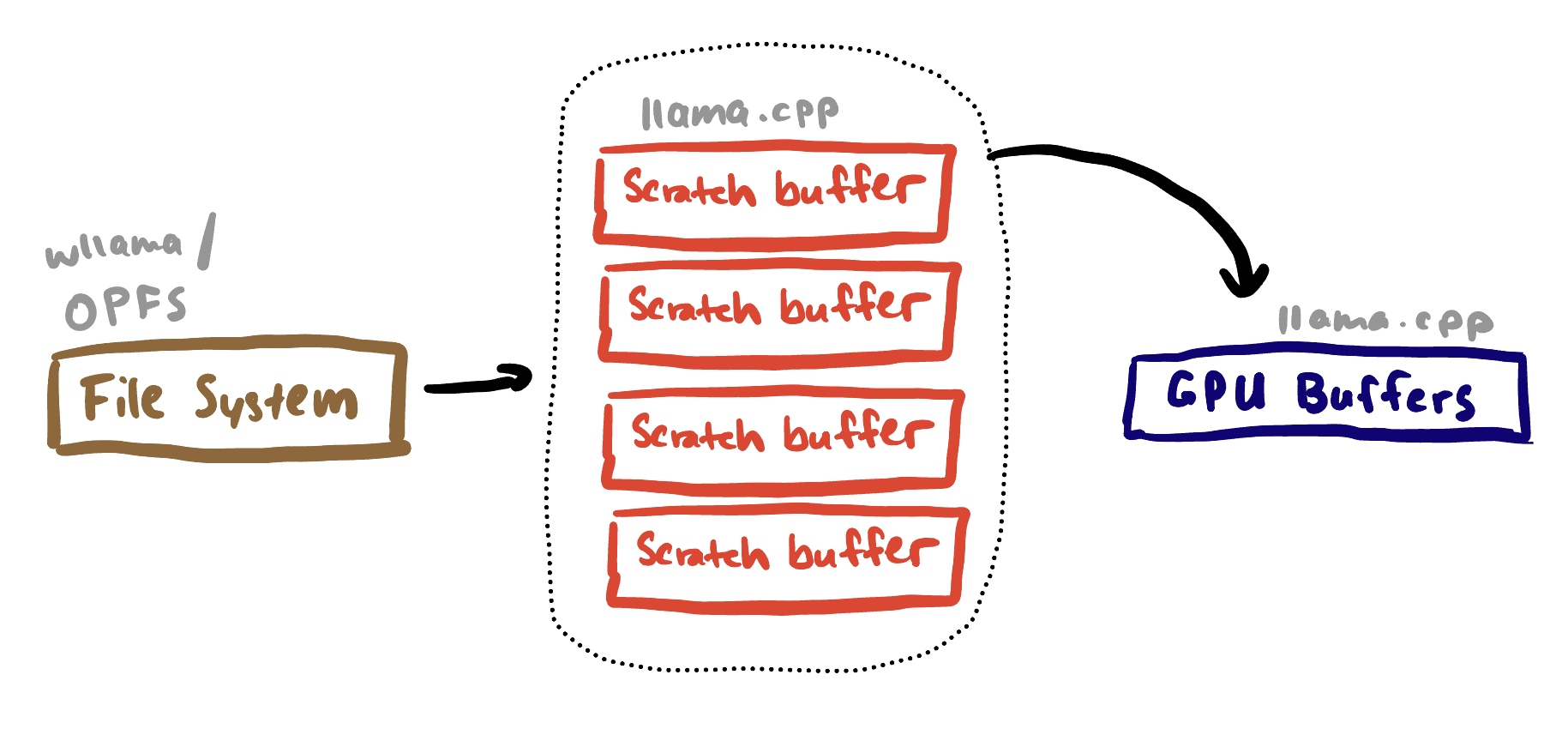
- Asynchronous: use a pre-allocated pool of four 1MB buffers concurrently
Reference: llama.cpp:src/llama-model-loader.cpp
Asynchronous Loading
The asynchronous loading mode uses a buffer pool of four 1 MB buffers, which bounds the intermediate staging memory to approximately 4 MB. The logic is in the llama.cpp weight loader code here.
Results
We saw even more memory savings by using the streaming weight loader!
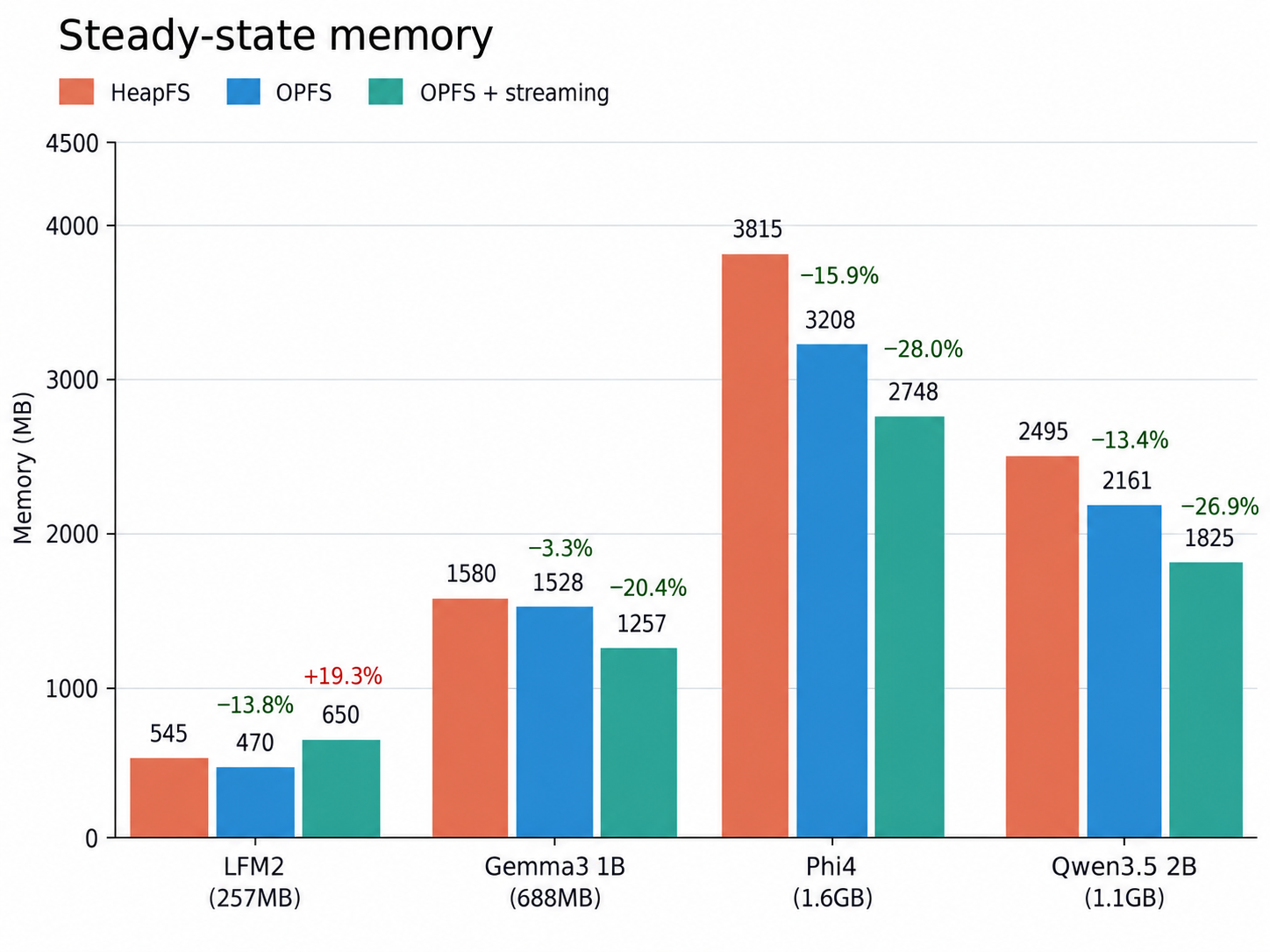
Of course, we haven’t eliminated all unnecessary memory usage, and mysteriously, memory usage for LFM2 went up. In particular, we still observed a mysterious cold-start memory spike in Safari, which turned out to be related to WebKit’s WebAssembly JIT compiler. More on that investigation in a later blog post!
Lessons Learned
1. Peak Memory Matters More Than Steady-State Memory
Browsers impose memory limits on tabs, so even temporary allocations can cause a tab to be killed.
This is especially problematic with WebAssembly, whose linear memory can grow but generally cannot shrink. Temporary allocations can still therefore eat at the maximum memory budget.
2. Streaming Turns Model-Sized Allocations into Bounded Allocations
Instead of staging an entire model in memory, streaming lets us process it in small chunks. This changes the scratch memory usage from being proportional to the model size, to being bounded by a fixed-size buffer pool.
In our case, asynchronous loading uses just four 1 MB buffers.
3. Avoid Copies in Memory-Constrained Environments
If you are in a memory-constrained environment, be careful not to make unnecessary copies of data! That’s an easy way to burn your memory budget without noticing. We noticed other WebGPU-based inference engines made that mistake, unnecessarily wasting memory budget.
AI Disclosure
Code and blog post written by me, both lightly edited with Codex for correctness and feedback.